What transparency changes in a print
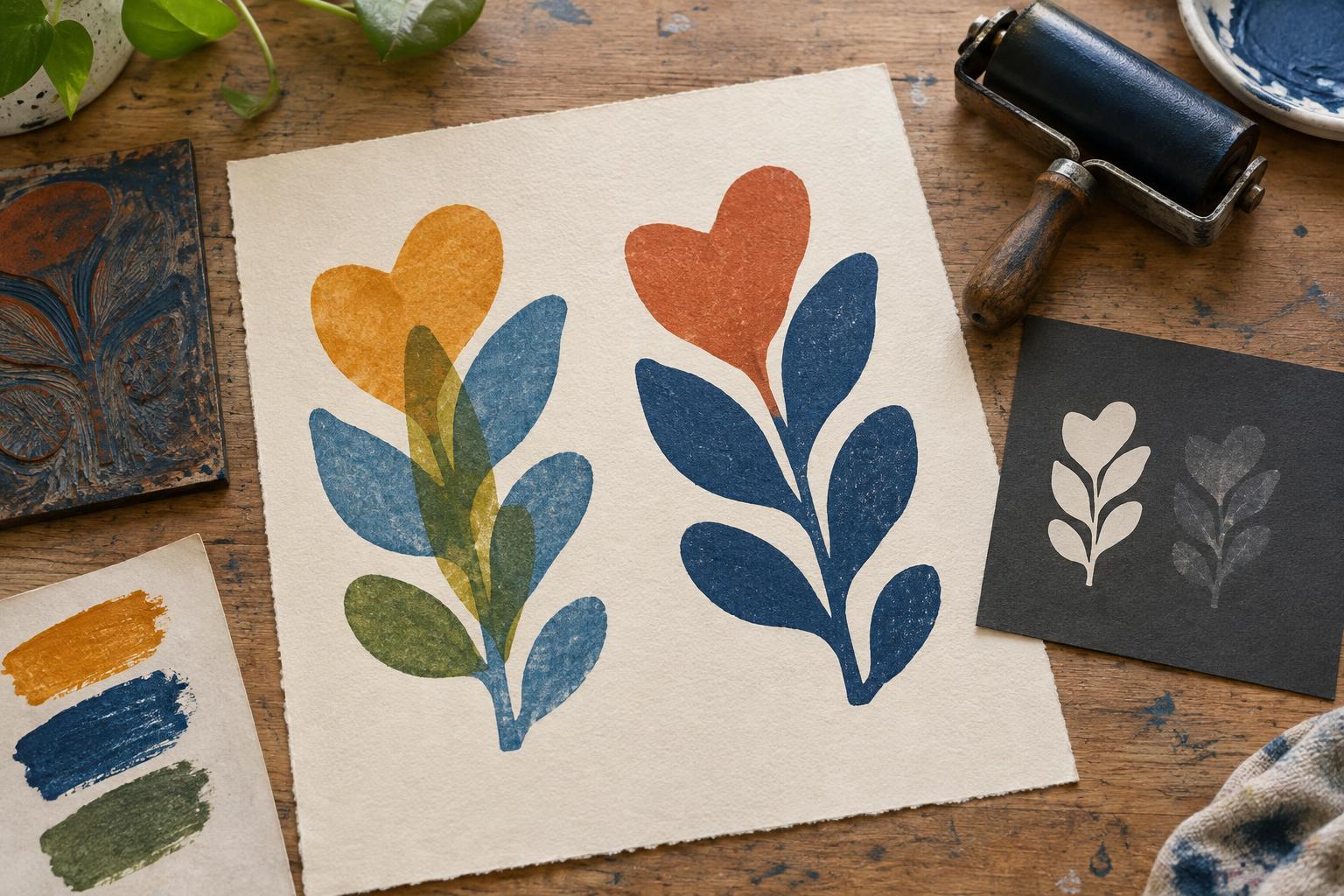
Transparent ink lets some of the color beneath it show through. Print a transparent blue over yellow, for example, and the overlap may appear green. The exact result depends on the inks, the paper and how much ink transfers. Opaque ink covers more of what lies underneath, so its printed color stays closer to its appearance on a light surface. Neither type is inherently better: they offer different ways to build an image.
Transparency is not an all-or-nothing label. Some inks are naturally more covering than others, and even an opaque ink can reveal the layer below if it is rolled or wiped very thinly. A generous layer of transparent ink may look darker or more saturated without becoming fully opaque. Treat the label on a tin or tube as a starting point, then judge the ink by its printed result.
Choose transparent ink for layered color
Transparent inks are useful when you want overlaps to create additional colors without cutting a separate block or preparing another plate for each one. In a two-color relief print, you might print a warm yellow shape first and place a transparent red shape across part of it. Where they meet, the yellow can influence the red. This approach rewards careful planning: the order of the layers matters because the earlier color remains visible through the later one.
Transparency can also give an image a sense of depth. A light second layer may modify a background while leaving its texture visible. On white paper, light passes through the ink and reflects from the sheet, often giving transparent color a luminous quality. On darker or strongly colored paper, that same ink may look subdued because the paper color also shows through. If you need a transparent color to remain bright, consider a lighter paper or a printed light-colored base beneath it.
Choose opaque ink for coverage and clear shapes
Opaque ink is helpful when a shape needs to read distinctly against another color. It can simplify a design with bold, separate areas and can make printing on colored paper more predictable. A covering white or pale ink, for instance, may stand out on a dark sheet where a transparent pale color would largely disappear. Coverage still varies by ink and application, so make a sample rather than assuming one pass will conceal the paper completely.
Opaque ink can also hide an earlier layer that you intended to keep. If your design relies on visible overlaps, reserve opaque ink for selected shapes or use it as an underlayer. A light opaque base printed first may help a later color show on dark paper, but it adds a registration step and another layer to manage. Simple, high-contrast designs often benefit more from dependable coverage than from complex color mixing.
Account for paper, thickness and drying
Paper changes the comparison. A smooth, pale sheet makes it easier to see subtle differences between transparent layers. A textured or absorbent sheet may give less even coverage, especially where a thin ink film catches only the raised surface. Before choosing an ink for an edition, test it on the paper you intend to use. A result that looks clear on a scrap of white paper may be quite different on the final stock.
Ink film thickness matters too. Adding more ink is not always the best way to gain opacity: an overly heavy layer can obscure fine marks, transfer unevenly or take longer to dry. Likewise, thinning ink without guidance may alter how it prints. Use modifiers intended for your particular ink system and follow the maker’s directions, especially when combining products. Let test prints dry before making a final color decision; freshly printed ink can look different from the finished impression.
Make a small test before printing an edition
Create a test sheet with three areas: bare paper, a first printed color and a second color printed across both. This lets you compare the second ink on its own with its appearance over another layer. If you are considering opaque ink for a dark sheet, include a patch of that paper as well. Label each test with the ink, paper and printing order so you can repeat a successful combination.
Once the samples are dry, ask what the image needs. Do the overlaps add useful color, or do they muddy an important shape? Is the covering layer strong enough, and are fine lines still visible? Choose transparent ink when interaction between layers is part of the design; choose opaque ink when a shape needs to hold its own. Many prints use both, with each doing a different job.